Every part of Jido, as it appears in the system
This page is built on Jido's real screens: every number on a screen points to a real part of it, explained alongside.
Home
Dashboard
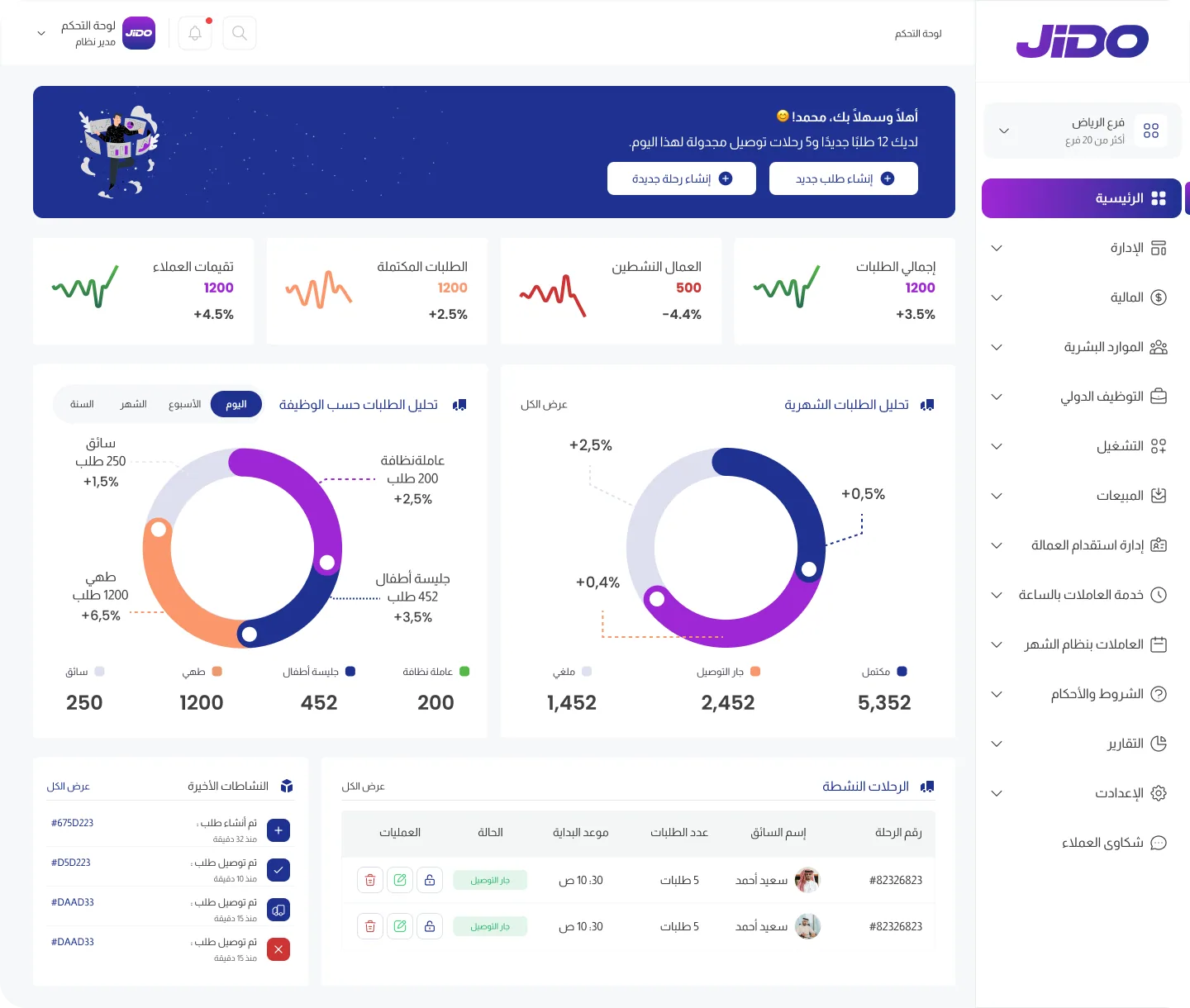
The first thing users see after logging in: today's summary, company indicators, request analysis and ongoing trips.
- Dashboard
Names and figures on the screen are demo data.
Branch switcher
Move between company branches from the top of the sidebar.
Today's summary
New requests and delivery trips scheduled for today, with buttons to create a new request or a new trip.
Performance indicators
Total requests, active workers, completed requests and client ratings, with the rate of change.
Requests by job
Housekeeper, babysitter, cook and driver, by day, week, month and year.
Monthly requests by status
Completed, out for delivery, cancelled.
Active trips
Trip number, driver, number of requests, start time and status, with action tools.
Recent activity
The latest events on requests, such as a request created or delivered.
Search and notifications
Quick search and system alerts from the top bar.
Operations
Ongoing trips
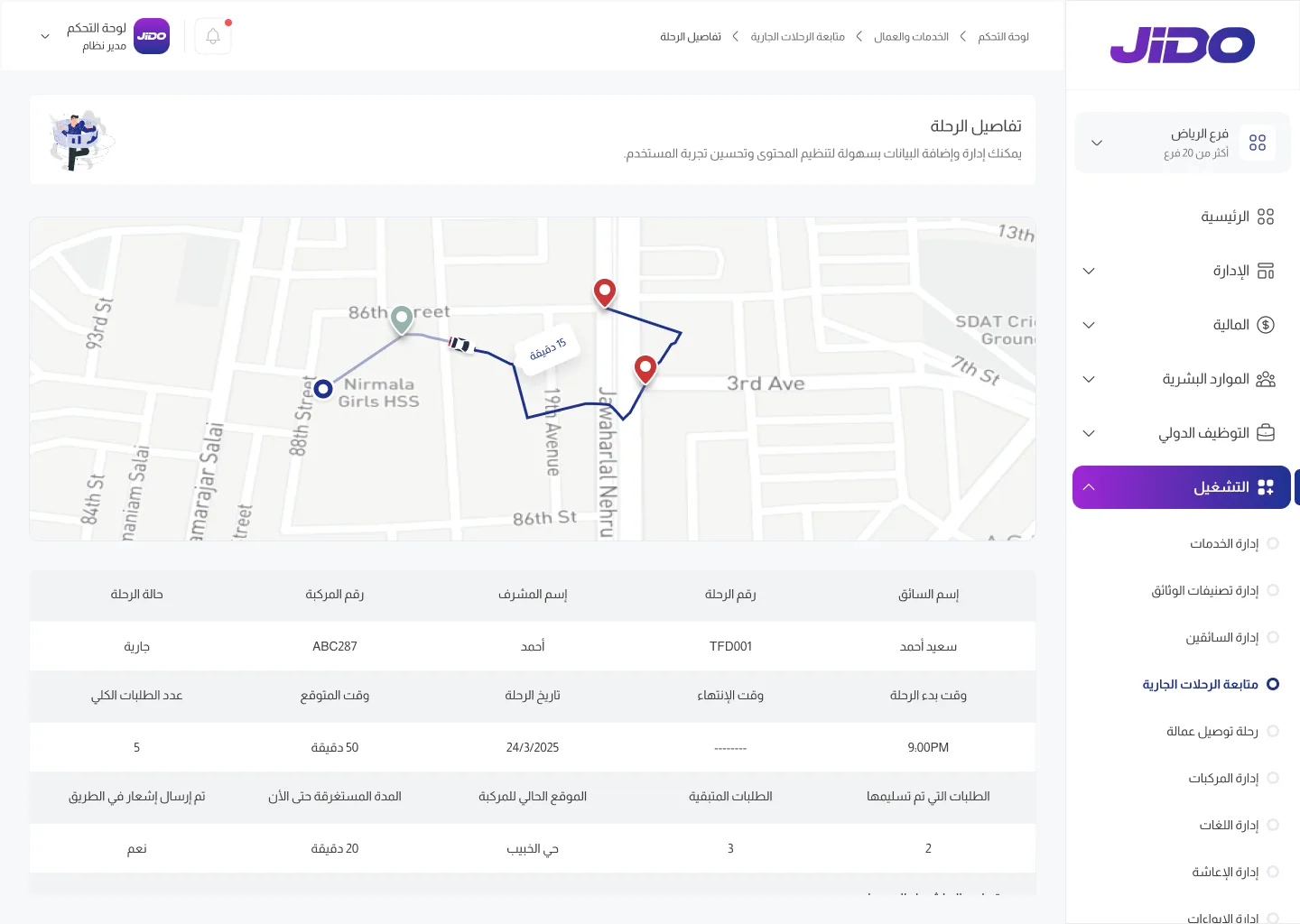
A worker delivery trip as the operations team follows it, from the map to the last request.
Operations: module pages
- Services
- Document categories
- Drivers
- Ongoing trips
- Worker delivery trip
- Vehicles
- Languages
- Notifications
- Dashboard
- Services and workers
- Ongoing trips
- Trip details
Names and figures on the screen are demo data.
Trip map
The route, stops, vehicle location and time remaining.
Trip details
Driver name, trip number, supervisor, vehicle number and trip status.
Timing
Start and end time, date, expected time and total number of requests.
Trip progress
Delivered and remaining requests, the vehicle's current location, elapsed time, and an on-the-way notification.
Operations menu
Services, document categories, drivers, ongoing trips, worker delivery trip, vehicles, languages, notifications.
Sales
Client file
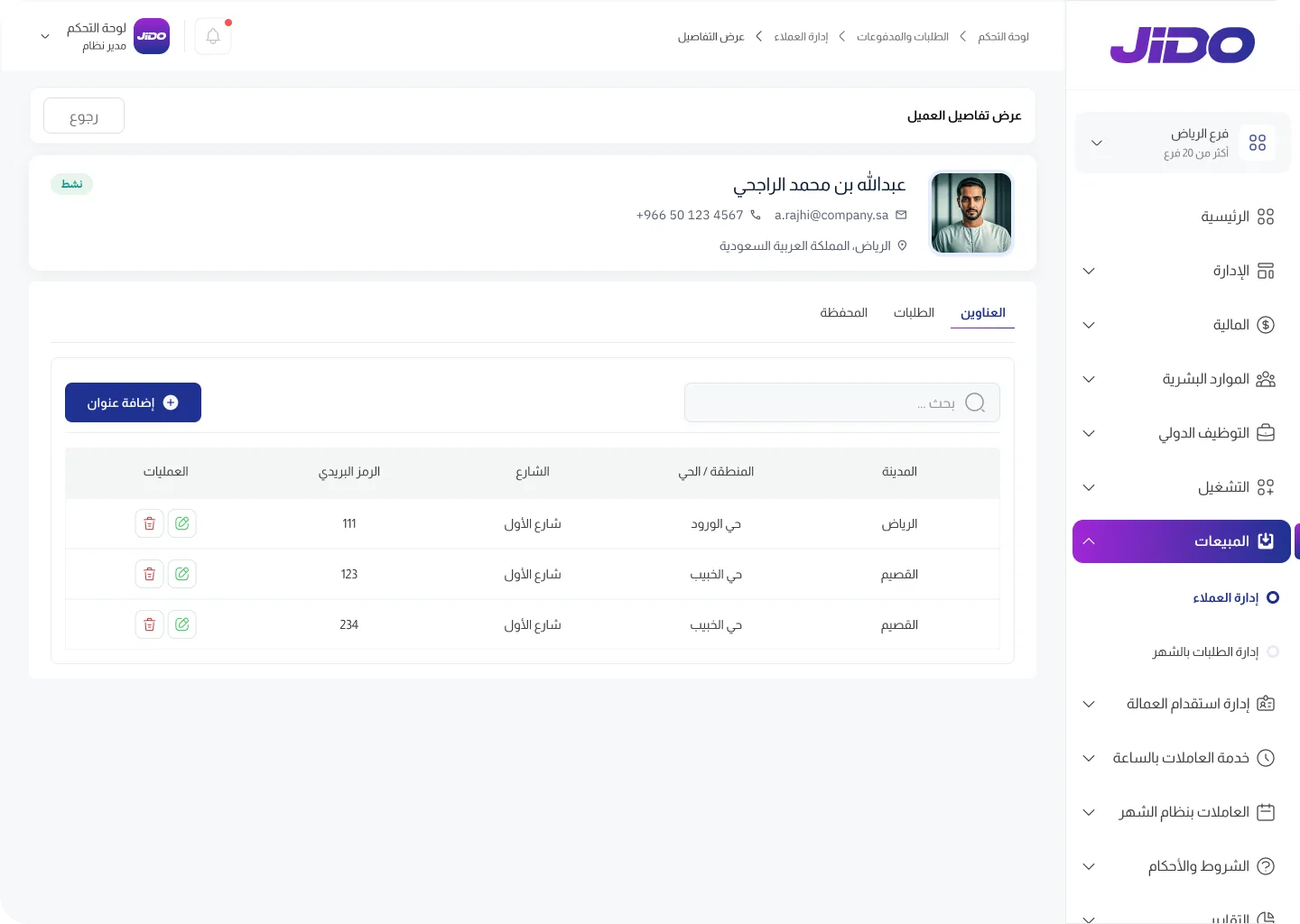
Everything about a client on one page: details, addresses, requests and wallet.
Sales: module pages
- Clients
- Monthly requests
- Dashboard
- Requests and payments
- Clients
- View details
Names and figures on the screen are demo data.
Client card
Name, mobile number, email and location.
Client status
The account status is shown at the top of the file.
Tabs
Addresses, requests, wallet.
Add an address
Add a new address and search existing ones.
Address table
City, area/district, street and postal code, with edit and delete.
Human resources
Employees
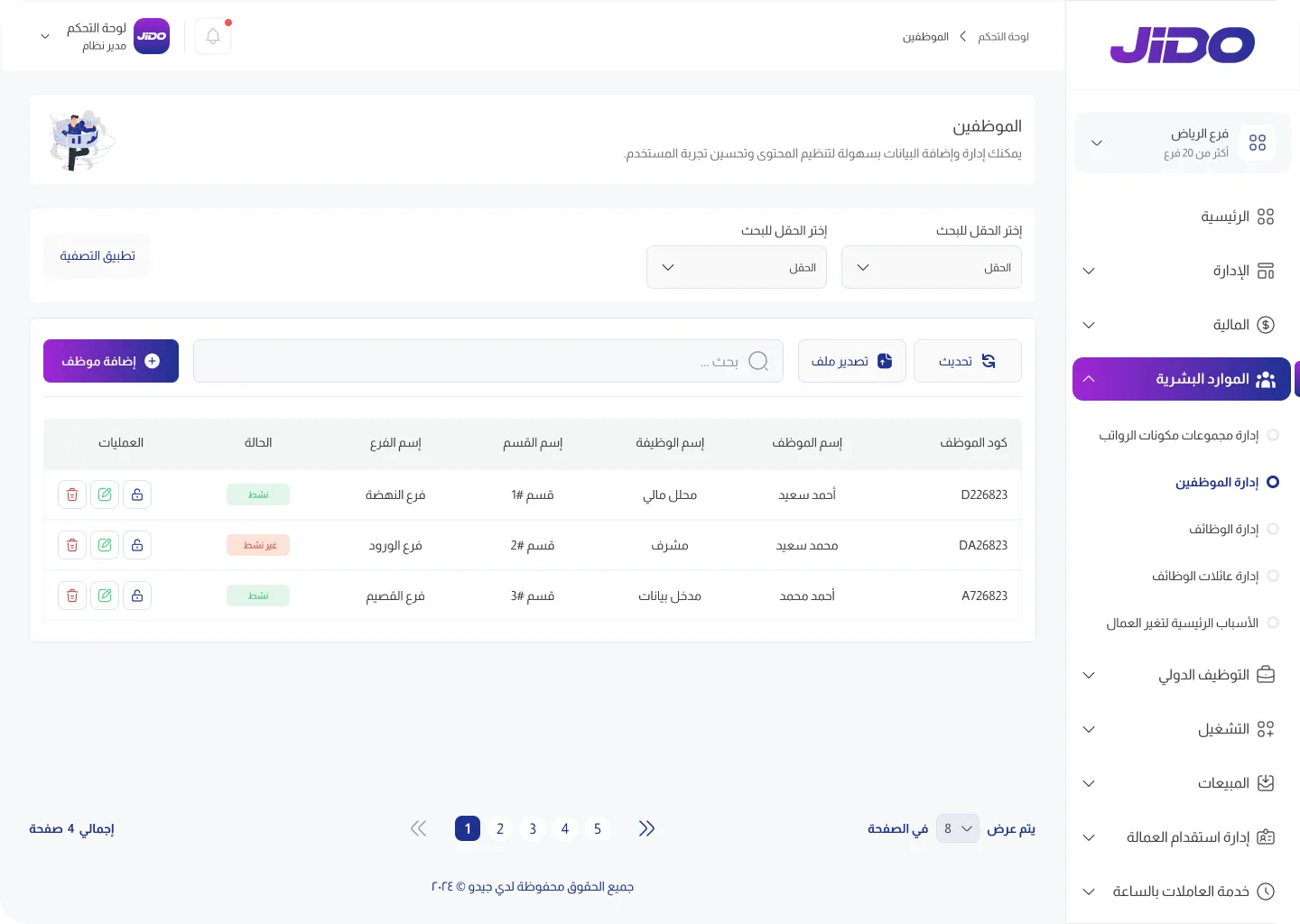
The register of company employees across all branches, with search, filter and export tools.
Human resources: module pages
- Payroll component groups
- Employees
- Jobs
- Job families
- Main reasons for worker changes
- Dashboard
- Employees
Names and figures on the screen are demo data.
Filters
Choose the fields to filter by, then apply.
Refresh and export
Refresh the list and export a data file.
Add an employee
Add a new employee from the same screen.
Employee table
Employee code, name, job, department, branch and status (active or inactive).
Action tools
Tools for each employee in the table, including edit and delete.
Pagination
Items per page and moving between pages.
Reports
User activity analysis
From the analysis and comparisons section: how your team uses the system through the day and week.
Reports: module pages
- User activity analysis
- Session length distribution
- Dashboard
- Analysis and comparisons
- User activity analysis
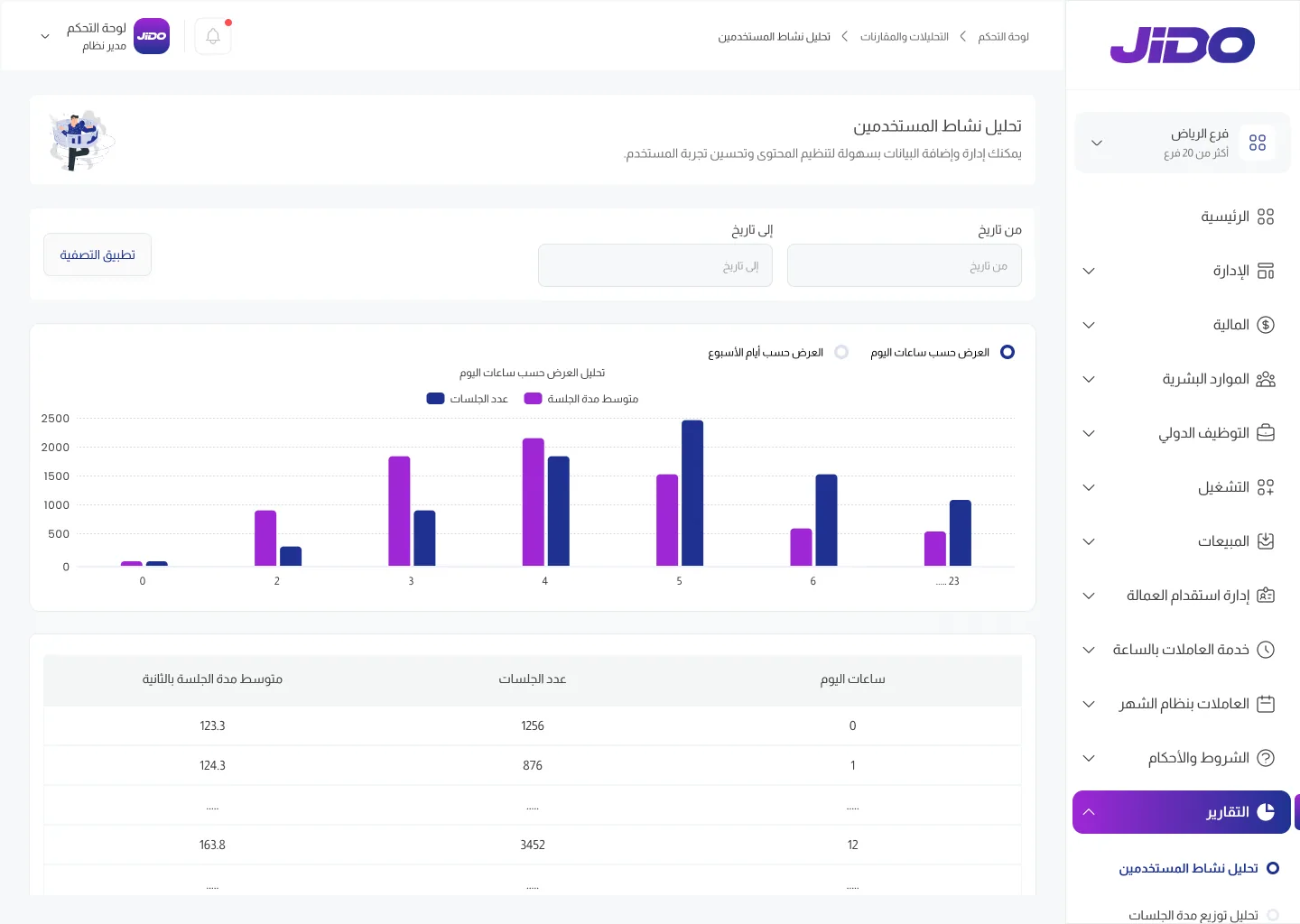
Names and figures on the screen are demo data.
Date range
From and to dates, then apply the filter.
View by
By hour of day or by day of week.
Sessions and length
Two bars per period: number of sessions and average session length.
Detailed table
Hours of the day, number of sessions and average session length in seconds.
Main menu
Jido's fourteen modules
In the order they appear in the system's sidebar. The modules whose screens are shown above are listed here with their pages.
Home
The dashboard: today's summary, request, worker and rating indicators, and request analysis with active trips.
See the annotated screenHuman resources
The employee register by job, department, branch and status, with jobs, job families and payroll components.
- Payroll component groups
- Employees
- Jobs
- Job families
- Main reasons for worker changes
Operations
Services, drivers and vehicles, and tracking worker delivery trips on the map.
- Services
- Document categories
- Drivers
- Ongoing trips
- Worker delivery trip
- Vehicles
- Languages
- Notifications
Sales
A file for every client with addresses, requests and wallet, plus monthly request management.
- Clients
- Monthly requests
Reports
Analysis and comparisons of user activity by hour of day or day of week, within a date range you set.
- User activity analysis
- Session length distribution
Other modules in the menu
These modules appear in Jido's main menu. Contact us and we will walk you through them in detail.
- Administration
- Finance
- International hiring
- Worker recruitment
- Hourly workers service
- Monthly workers
- Terms and conditions
- Settings
- Client complaints
Want to see these screens in action?
Book a demo with the Jido team, or message us directly on WhatsApp.
Or call us: +966 55 806 8777